Data Products
Cyber data for AI development.
Order simulations, trajectory collections, evaluations and training datasets built around the missions your AI needs to perform.
Data Products
Choose the product. Agree the scope. Receive the evidence and data.
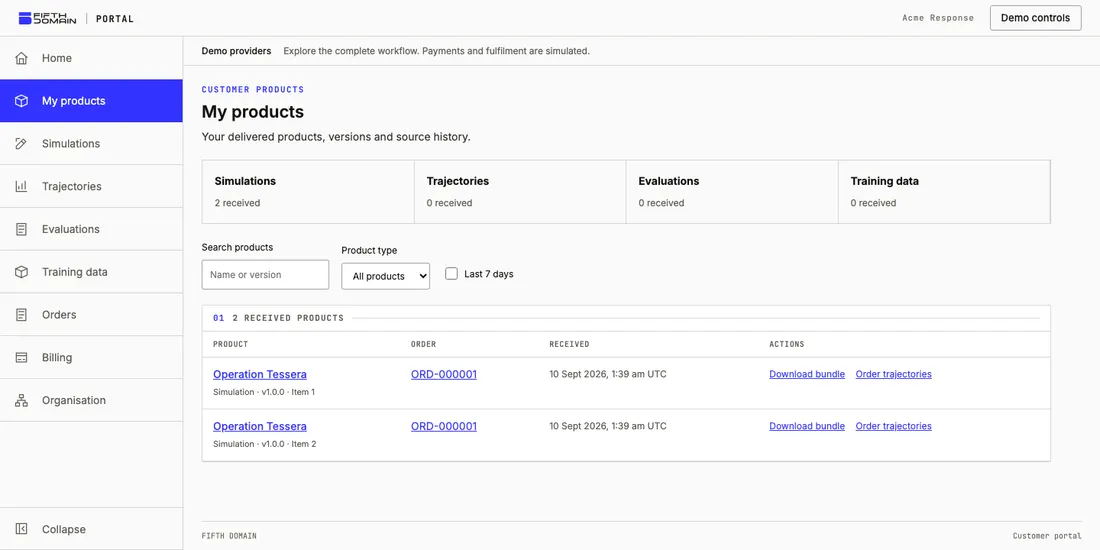
Four products, your own portal
Contact our team with the product you need. We agree the scope and set up a dedicated portal for your organisation: your workspace for requirements, quotes, order progress and delivered products. There is no public self-service sign-up. You can reuse delivered product versions as inputs for a later order, or supply your own versioned inputs with their provenance.
| Product | What you specify | What you receive |
|---|---|---|
| Simulations | Mission, agent, deployment targets and constraints. Review concepts shaped with CONNOR. | A LEAP.FROG simulation package: environment bundle, mission manifest, architecture and reference solution. |
| Trajectories | Simulation versions, agent and model, harness, run count, time budget and required evidence. | XORCISE.AI run inventory and captured evidence: events, prompts, artifacts, outcomes and telemetry as ordered. |
| Evaluations | Trajectory versions, operating envelope, evaluation framework, criteria, thresholds and evidence coverage. | XORCISE.EVAL reports with criterion scores, coverage and supporting evidence; an aggregate order also includes a trust case. |
| Training data | Trajectories with matching mission inputs, rubric, reference solution and learner prompt. Choose an export profile, learner, token limit and split. | A XORCISE.TUNE dataset package with JSONL records, provenance, quality results and exclusions. |
Each order covers one product kind. Trajectory collections use one agreed agent, model and harness configuration, with up to 500 runs per collection. Order separate collections to compare configurations. Failed runs remain useful evidence and are recorded with their actual outcomes and any evidence gaps.
From a mission to a dataset
LEAP.FROG generates simulations. XORCISE.AI runs agents against copies of those simulations and captures their experience. XORCISE.EVAL assesses deployability against an operating envelope. XORCISE.TUNE turns supplied trajectories and mission references into annotated data for your downstream training pipeline.
Your customer portal tracks agreed orders and deliveries. Production takes place in those apps; requesting a dataset does not start model training.
Inside a TUNE dataset
TUNE organises trajectory evidence into five cumulative tiers. These describe the contents of a training-data product, rather than five separate portal order types.
| Tier | Contents added | What it tells you |
|---|---|---|
| T1: Trajectory Data | Raw events, observations, actions, tool calls, outputs and timestamps. | What the agent did. |
| T2: Mission Data | Mission architecture and the supplied reference solution. | The environment, objectives and reference approach. |
| T3: Graded Data | Mission grading against the rubric and available execution evidence. | Whether the observed actions met the objectives. |
| T4: Evaluated Data | AI assessment of behaviour and process quality. | How the agent performed, including errors and recovery. |
| T5: Improvement Data | AI-proposed preferred actions grounded in earlier observations and the reference material. | Suggested next-action targets for model development. |
TUNE’s T4 behaviour assessment is distinct from an XORCISE.EVAL deployability report. AI-generated grades, evaluations and preferences retain their origin and limitations. An improvement proposal is an unexecuted judgement, not proof that a new action succeeds. The reference solution must match the historical mission version; a synthetic example is not an expert-verified solution.
Choose an export profile
| Profile | JSONL record fields | Intended use |
|---|---|---|
| Annotated trajectories | Trace, mission references, annotations, quality results and provenance. | Inspect the complete annotated evidence, including quarantined annotations and their reasons. |
| SFT next-action text | prompt, completion |
Supervised fine-tuning on eligible preferred next actions. |
| DPO next-action text | prompt, chosen, rejected |
Preference optimisation using distinct proposed and observed actions. |
SFT and DPO are text next-action formats, not native tool-call protocols. Your trainer controls the text template, token budget and, for SFT, completion-only loss. Training exports include only eligible proposals that passed TUNE’s AI quality checks. Synthetic fixtures are excluded. An AI quality pass does not mean external verification or execution.
The package includes the producer ZIP, extracted records, file hashes, record provenance, recipe and model information, counts, quality reports and exclusions. Learner prompts contain only the permitted context before the selected action. Evaluator-only reference material stays separate.
Choose all-training with no held-out claim, or a validation split grouped by mission. Mission validation requires at least two distinct missions; versions and runs of the same mission stay on the same side of the split. Licensing and permitted use are agreed with the order under the product terms.
Inspect the data before you use it
Delivered products in the portal expose their metadata, evidence and available record previews, alongside the downloadable files. Review the run and mission inventory, quality results and exclusions before adding a package to your pipeline.
Request a representative sample with your intended format and use case through our team. Samples supplied for format testing are identified separately from data eligible for training or evaluation.
Order and receive
01 Request
Your requirements.
- · Contact our team about a simulation, trajectory collection, evaluation or training dataset.
- · Describe the mission, agent or model, and intended use. Select existing product versions or supply your inputs.
- · Specify the format and constraints, or ask us to resolve the open choices.
02 Approve
An agreed scope and quote.
- · Review the proposed scope and resolve any missing inputs with our team.
- · Accept the quote and complete the applicable payment or billing step.
- · We set up your organisation's portal so your team can follow production.
03 Receive
Your product, in your portal.
- · Inspect the delivered product version, its evidence and metadata.
- · Download the validated package and files from your organisation's portal.
Your team reviews the quote before production. Completed deliveries are validated and registered as product versions in your organisation’s portal, with checksums and source references. You can inspect the files there and download them into your own environment.